Job detail
Job detail is one assigned appointment. The My work card summarises your execution. The action dock at the bottom is where you tap.
Screen path: Today or Jobs → job row → /app/jobs/:appointmentId. Native Field is not the Field PWA and not the CMS.
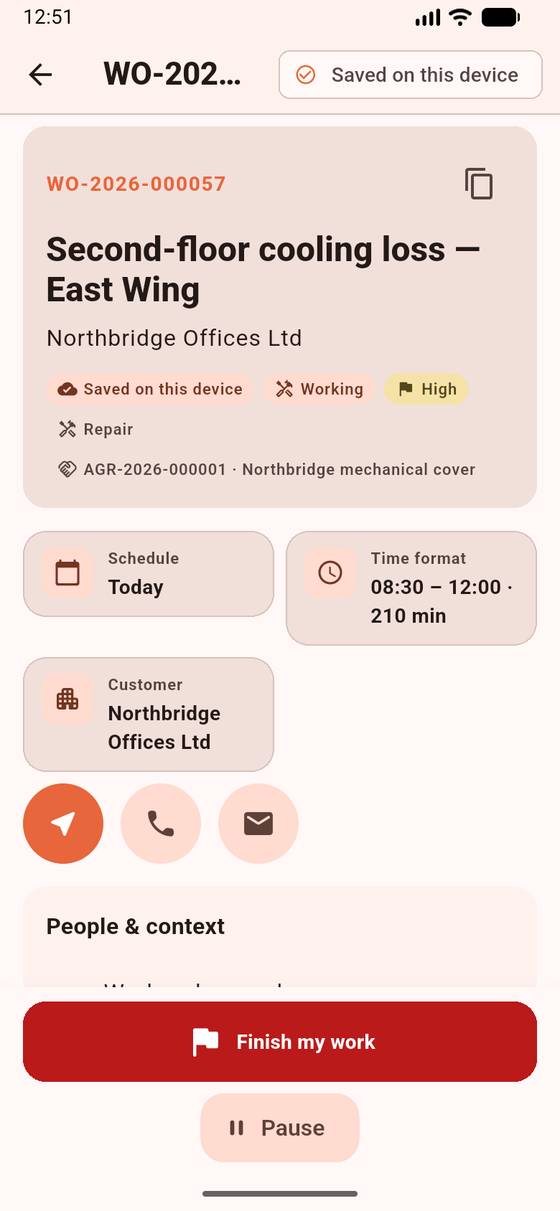
Job detail while Working. Finish my work ends your assignment only; it does not complete the appointment. On Assigned the primary dock action is Start work instead.
Preconditions
Section titled “Preconditions”The appointment must still be in the cache and assigned to you. If the office revoked it: This job is no longer assigned. Unsynced work is saved on this device. The job becomes read-only. If it is not in the cache: This job is not available offline.
What you see — section order
Section titled “What you see — section order”The header shows the work-order number (copyable), headline, and customer. Quick actions: Open, Navigate (OS maps), Call / Email when projected. Maps and tel links never receive the Field Bearer token. The site address on Where is the visit site, not the customer billing address. There is no technician free-text job-notes field.
| Section title | What you do |
|---|---|
| People & context | Work-order number, customer, site contact, crew already projected |
| The job | Work-order description and Job instructions |
| Where | Site name, visit address, access, parking. Copy address. Navigate is the header action |
| My work (summary) | Your execution status and timers. Actions live in the dock |
| Forms | Checklists — hidden if capability forms is off |
| Findings | Add a finding — does not create a work order |
| Evidence | Before / After / General photos |
| Customer signature | Capture pad — hidden if capability signatures is off |
| More details | Assets (read-only), Closeout (Complete job), Parts & services |
On Assigned, the primary dock action is Start work; Start travel remains available.
- Read The job and Where.
- Tap the allowed dock action (typically Start work).
- Fill modules while Working.
- Finish my work, then expand More details → Closeout → Complete job.
What works / does not work
Section titled “What works / does not work”| Works | Does not work | |
|---|---|---|
| Execute your assignment | Dock + modules | Completing the parent work order |
| Assets | Read-only under More details when customer_assets is on |
Asset CRUD, form asset picker |
| Job notes | Forms, findings, evidence | Free-text job-notes field |
If you expected Closeout or Parts at the top: expand More details. If Navigate does nothing: copy the address from Where.
Related: Execution lifecycle · Complete job.