Findings
Findings are form-linked inspection items. Native Field does not offer a standalone CAPA module. Start work before recording a finding.
Screen path: job detail → Findings → Add a finding, or a form → Add a finding (/app/jobs/:appointmentId/findings/create). Native Field is not the Field PWA.
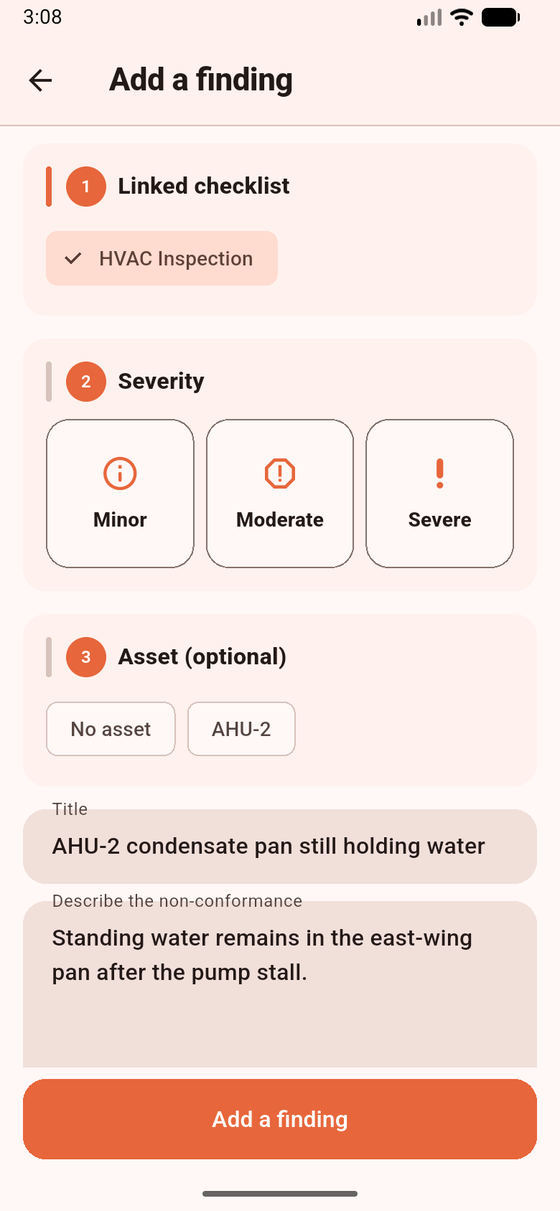
Add a finding is linked to a checklist. Sample data. Follow-up work orders are an office action.
Help text: “Record a non-conforming observation linked to a checklist. This does not create a work order by itself.” Empty: No findings on this job.
Preconditions
Section titled “Preconditions”You must be Working. Select a Checklist when required (error: Select a checklist.). If findings are not in the projection, the entry point is not offered.
- Open Findings → Add a finding (opening from a checklist may pre-attach that form instance).
- Set Severity (Not set, Minor, Moderate, Severe). Fill Describe the non-conformance.
- Save. Status starts Open. The row may show Waiting to sync.
- On a synced finding you can Resolve, enter a Resolution note (required), and confirm Mark resolved. Status becomes Resolved.
- If it has not synced yet: “Wait until this finding has synced before resolving it.”
Statuses Open / Resolved. Creating a finding does not create a work order. Office may open a follow-up WO (0..1) later. That Draft is not a Field job until office assigns an appointment.
Open findings do not block Complete job.
What works / does not work
Section titled “What works / does not work”| Works | Does not work | |
|---|---|---|
| Offline create while Working | Yes (queued) | Resolve before a server id |
| Failed checkbox | Manual Add a finding | Auto-create from a check |
| Closeout | Forms / evidence / signatures / Finish | Open findings as a blocker |
| CAPA | Not offered | Standalone quality module |
Closed job: “This job is closed.” Store failure: “Unable to save this finding offline.”
If you expected a new job after save: copy is explicit — this does not create a work order by itself.
Related: Web findings · Complete job.