How Veldriq works
Laravel is the authority. Clients (CMS, portal, public booking, Field PWA, native Field) read and write through your deployment. They do not keep a private source of truth for jobs or money.
Objects you will meet
Section titled “Objects you will meet”| Object | Meaning |
|---|---|
| Customer | Who you serve. |
| Contact | A person at that customer. |
| Site | A location (address, timezone). Dispatch geography and Field “today” use the site timezone. |
| Asset | Equipment at a site (capability customer_assets). |
| Service request | Optional intake. Convert 0..1 to a work order. Not created by public booking. |
| Work order | The job. Technicians never create these in Field. |
| Appointment | One visit on that job. Field shows visits assigned to the signed-in technician. |
| Technician | Workforce profile linked to a CMS user. Field needs an active technician plus field.workspace.view. |
See core concepts for dedicated pages.
How demand enters
Section titled “How demand enters”- Office New work order (starts Draft until Open).
- Convert a service request.
- Public booking — Draft work order + Scheduled appointment + first eligible technician. Not a service request.
- Portal Book service (authenticated customer) using the same scheduling policy.
- Preventive maintenance generation — Draft work orders. It does not dispatch.
- Accepted estimate still needs explicit Convert to a work order.
Work order vs appointment
Section titled “Work order vs appointment”A work order can have several appointments (diagnostic, then return). Completing a visit (Closeout) does not Complete the work order. Finish my work only ends your technician assignment.
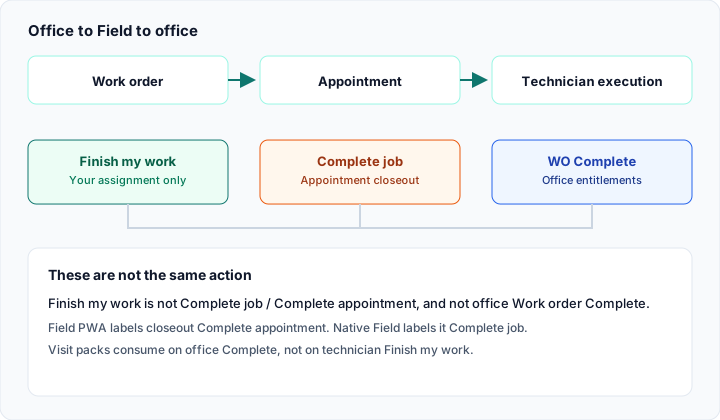
Office Complete vs appointment Closeout vs Finish my work. Sample diagram from the buyer manual.
Field execution
Section titled “Field execution”The first Start travel or Start work on an appointment can move it In progress. Finish my work does not complete the appointment. Completing the appointment is Closeout → Complete job. Office Complete on the work order is a third step.
Commercial follow-up
Section titled “Commercial follow-up”Estimates, invoices, payments, and credit notes are optional modules (capabilities). Accepting an estimate does not create a work order by itself. A credit note is not a refund.
Recurring work
Section titled “Recurring work”Service agreements can include visit packs. Preventive maintenance generates Draft work orders on a schedule (queue + scheduler required). Visit entitlements consume on office Complete with intent — not on Field Closeout. Exhaustion does not block Complete. Remaining = 0 still succeeds.
If Field is empty after you created a job: the work order is still Draft, or there is no dated assigned appointment. If Accept did not create a job: Accept alone is not enough — office Convert to work order.